Bouncing DVD Logo After Effects Alternative
Create DVD screensaver animations without After Effects. No plugins. No templates. No keyframes.
Make a bouncing DVD logo animation without After Effects. Upload your image, preview the animation instantly, and export a perfectly looping GIF or MP4 in seconds. All in your browser.
Trusted by streamers, designers, and brands for fast looping logo animations.
After Effects vs DVDify
After Effects
DVDify
Manual keyframes & expressions
Upload -> live preview -> export
Manual edge collision logic
Automatic bounce physics
Long render queues
Exports in seconds
$22.99/month subscription
Free to use
Why This Works Better Than After Effects
After Effects excels at complex motion graphics and compositing. For a bouncing DVD logo animation, though, you're using a fraction of its capabilities while dealing with all of its complexity.
Creating a bouncing DVD logo in After Effects requires importing your logo, creating a composition, setting up position keyframes, writing expressions to handle edge detection, adding color change logic, and finally queuing a render that can take several minutes. If you need to adjust the timing or colors, you're back in the timeline making changes and re-rendering.
DVDify handles all of that automatically. The physics, color changes, and perfect loops are built in. You see the animation playing in real-time as you adjust settings, and exports finish in seconds instead of minutes.
What You Can Create
A bouncing logo animation works for more than just nostalgia. Content creators use them as stream intermission screens. Social media managers turn them into looping posts that stop the scroll. Marketing teams add them to presentations or digital signage. Developers drop them into loading screens or hero sections.
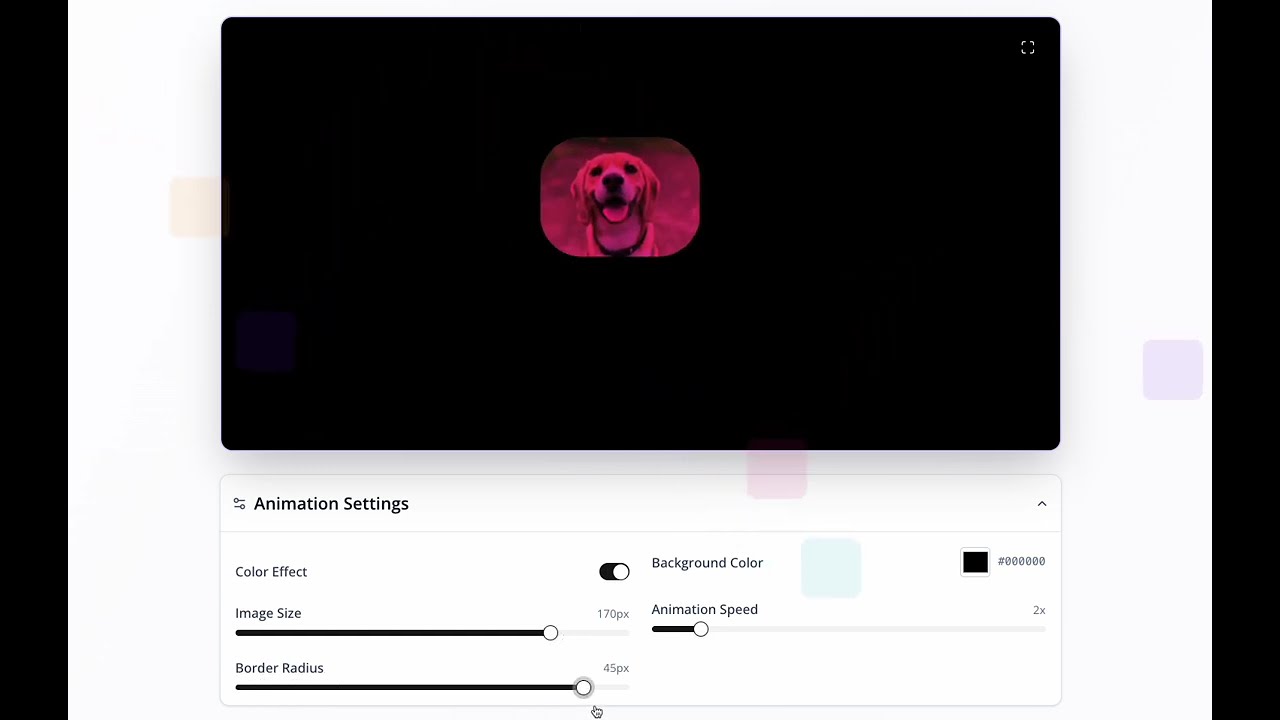
The animation includes the DVD screensaver style image shifts through different hues each time it hits an edge. You can turn this off to keep your brand colors intact, or lean into it for a more playful result. Speed is adjustable from a slow drift to a rapid bounce, and the background can be any solid color you need.
Export Options That Actually Matter
Download as MP4 for video platforms and presentations, or as GIF for easy embedding anywhere. Both formats support perfect loops. The animation seamlessly repeats without any visible jump or pause.
Rendered in HD so the animation looks sharp on high-density displays and large screens. Duration is configurable from a few seconds to several minutes, depending on where you plan to use it.
No Learning Curve
After Effects has a steep learning curve. Even following a tutorial, you'll likely run into issues with versions, missing plugins, or confusing error messages.
This DVD screensaver tool works the same way for everyone. Upload an image, see it bounce, and export. The interface is self-explanatory, and you'll have a finished animation in minutes, not hours.
Cost Comparison
After Effects requires an Adobe Creative Cloud subscription starting at $22.99/month. For a single bouncing logo animation, that's an expensive option.
DVDify is free for basic use, with optional premium export options. You can create and download animations without any subscription.
What people usually use this for
Export your video in multiple formats
Up to 15 hours • No subscription required
Browser-Based
No software installation. Upload your image and adjust settings directly in your browser.
Instant Preview
See your animation playing live. No waiting for render queues or progress bars.
Simple Controls
Adjust speed, size, and colors with sliders. No keyframes or expressions needed.
Frequently Asked Questions
How to get the DVD screensaver?
Upload any image to DVDify and it instantly creates a bouncing DVD logo screensaver animation. No downloads or software installation needed. It runs entirely in your browser. Customize the speed, size, and colors, then export as MP4 or GIF.
Can I make a bouncing DVD logo without After Effects?
Yes. DVDify creates the same bouncing DVD logo animation directly in your browser, no After Effects, plugins, or keyframes required. Upload your image, adjust settings if you want, and export as MP4 or GIF in under 2 minutes.
Does the bouncing DVD logo ever hit the corner?
Yes! The logo can hit the corner perfectly, just like the original DVD screensaver. DVDify uses authentic physics, so all four corners align simultaneously when it happens, that satisfying moment everyone waited for. The timing is random, making each animation unique.
What formats can I export?
MP4 and GIF, both perfectly looping. MP4 works best for video platforms, presentations, and high-quality playback. GIF is ideal for easy embedding on websites, social media, and anywhere you need a simple animated loop.
Is this like the Google DVD screensaver Easter egg?
DVDify uses the same physics and color-changing effects as Google's DVD screensaver Easter egg, but lets you use any image instead of just the Google logo. Create your own version with your brand logo, photos, or any design you want.